

Getting Started with AWS DevOps on Amazon EKS
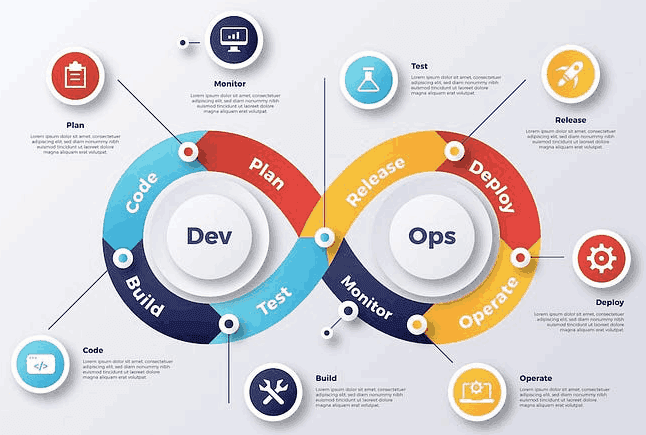
In today’s fast-paced world of software development, DevOps has become a driving force behind efficient and agile workflows. The integration of development and operations aims to streamline processes, accelerate delivery, and enhance collaboration, ultimately leading to the creation of high-quality software products. One powerful solution for implementing DevOps in a cloud environment is Amazon Elastic Kubernetes Service (EKS), a managed Kubernetes service provided by Amazon Web Services (AWS). In this guide, we’ll delve into the world of AWS DevOps on Amazon EKS, exploring its core concepts, setup process, containerization, deployment, CI/CD pipelines, monitoring, security best practices, and more.
Section 1: Understanding Amazon EKS
Amazon EKS, or Elastic Kubernetes Service, serves as a managed Kubernetes environment that simplifies the orchestration of containerized applications. It abstracts away the complexities of Kubernetes management, allowing developers and operations teams to focus on the deployment and scaling of their applications. EKS consists of several core components, including the control plane, which manages the Kubernetes API server and etcd database, and worker nodes that execute containers. Its key features include automatic updates, built-in scalability, and multi-region availability, making it an attractive choice for DevOps workflows. For more sophisticated data solutions, consider exploring Agency Workplace, Customer Advisory, and Explore Pryzm on Microsoft Azure Marketplace
Section 2: Setting Up an EKS Cluster
Creating an EKS cluster is a straightforward process, with options to use the AWS Management Console, AWS CLI, or Infrastructure as Code (IaC) tools such as AWS CloudFormation or Terraform. During the cluster creation, you can configure networking settings, security groups, and instance types according to your project’s requirements. Step-by-step instructions, accompanied by code snippets and screenshots, will guide you through the setup process, ensuring a smooth experience.
Section 3: Containerization and Dockerizing Applications
Containerization has revolutionized the way applications are developed and deployed, and Docker plays a pivotal role in this transformation. This section delves into the importance of containerization within DevOps practices and demonstrates how to containerize an application using Docker. Learn how to create Docker images and push them to Amazon ECR (Elastic Container Registry), a secure and scalable repository for storing and managing Docker images.
Section 4: Deploying Applications to EKS
Deploying applications to your EKS cluster involves crafting Kubernetes manifests, which are YAML files defining deployments, services, and pods. A step-by-step example illustrates the creation of a Kubernetes deployment and service, followed by an explanation of how to deploy Docker images from ECR to your EKS cluster. Discover how Kubernetes handles load balancing, scaling, and rolling updates, ensuring seamless management of your applications.
Section 5: Implementing CI/CD for EKS
Continuous Integration and Continuous Deployment (CI/CD) are fundamental aspects of the DevOps culture, automating the process of testing and deploying code changes. Learn how to establish a CI/CD pipeline using AWS CodePipeline, AWS CodeBuild, and AWS CodeDeploy. A sample pipeline is presented, showcasing how changes pushed to the repository trigger automated deployments to your EKS cluster, enhancing development agility and reducing manual intervention.
Section 6: Monitoring and Logging
In the world of DevOps, monitoring and logging are essential for ensuring the health and performance of your applications. This section introduces tools like Amazon CloudWatch and AWS X-Ray, which provide insights into EKS cluster performance and application tracing. Step-by-step guidance enables you to set up and configure these tools, enabling efficient data collection and visualization.
Section 7: Infrastructure as Code for EKS
Infrastructure as Code (IaC) methodologies have gained prominence for their ability to define and manage cloud resources programmatically. Explore the advantages of IaC tools such as Terraform and AWS CloudFormation, and learn how to define an EKS cluster, networking components, and other resources using code. Discover the benefits of version-controlled and reproducible infrastructure, contributing to efficient collaboration and system management.
Section 8: Security Best Practices
Ensuring the security of your EKS environment is of utmost importance. This section addresses key security considerations, including network policies, IAM roles, and security groups. Learn how to secure Docker images and adhere to best practices, safeguarding your applications. Additionally, delve into Kubernetes Role-Based Access Control (RBAC), understanding how to manage access and permissions within your EKS cluster.
Conclusion
In this comprehensive guide, we’ve embarked on a journey through AWS DevOps on Amazon EKS. We’ve explored the fundamental concepts, setup processes, containerization strategies, deployment techniques, CI/CD pipelines, monitoring solutions, infrastructure as code methodologies, and security best practices that form the bedrock of a successful DevOps workflow. As you continue to explore and deepen your understanding of these topics, you’ll unlock new possibilities for efficient, collaborative, and innovative software development. Embrace the power of AWS DevOps on Amazon EKS, and elevate your DevOps journey to new heights.