

Optimizing EMR Usage: Smart Integration with Nifi
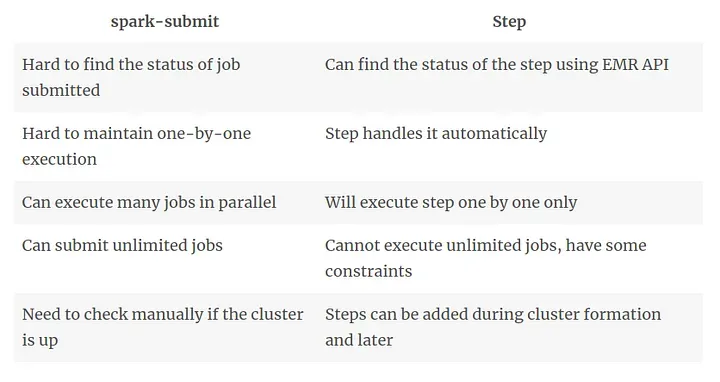
Once upon a time, we used to run a lot of Spark Jobs on EMR. We used NiFi to submit jobs to EMR cluster using the spark-submit command. NiFi knew where the EMR cluster is located by having configuration files (yarn-site.xml, core-site.xml) with it.
The job submission was supposed to be a sequential process for which Nifi used to submit jobs after waiting for some time since the last submission. But soon the following problems came
- Some jobs took time longer than the wait time for job submission, resulting in parallel job execution.
- Some jobs took very less time than the wait time, resulting in inefficient use of already awake cluster and increased processing time.
- It wasn’t easy knowing if a job is running, completed or failed.
- The EMR was always awake and running, hitting the financial budget.
The Renovation
After making some trips to the jungle of Amazon, Google and Apache, it was realised that EMR is more than a Hadoop Cluster. Nifi then agreed to use EMR’s capabilities in conjunction with its smart flow.
They agreed on following two things in order to optimize the whole scenario
- Use EMR Steps
- On-demand provision of EMR Cluster
Why Steps?
How to do On-Demand EMR provisioning
The following things were to be kept in mind for the dynamic behaviour
- If EMR is not running and there is a job to be submitted, provision EMR and add step
- If there is a job to be submitted and EMR is already provisioned, add step to it
- If there is no job to be submitted but EMR is running, delete the EMR
Nifi could do all these using AWS EMR API.
Now, Life has become so easy because
- EMR is working only when there is a need.
- Jobs are running in sequence and we can always know their status from AWS Dashboard.
- EMR runtime has come down from 24 hours a day to just ~ 5 hours a day. This is almost a 75% reduction in EMR utilization.
- The whole process completes in less time as there is no wait time like before.